Family Portrait With Dog
No photographer needed: use a family photo you already have and one photo of your dog.
2 free previews after sign-in. No subscription.
Start with one clear photo
Your family photo
Free previewWe keep your photo as it is and add your pet into it.
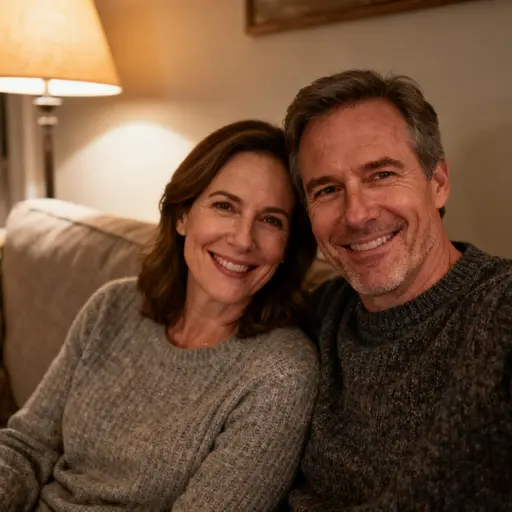
Best results: a sharp photo with some free space where your pet can sit. One pet is added each time.
A family portrait with a dog is a photo of the family together with their dog, usually taken by a photographer.
AI Pet Portrait makes one from photos you already have: upload a family photo and a photo of your dog, and the AI adds your dog into the picture in about 30 seconds, keeping its breed, coat markings and eye color.
A free watermarked preview comes first.
Add your pet to a photo in three steps
- 01
Upload two photos
The photo you want to keep and a clear photo of your pet, in JPG, PNG or WebP up to 10 MB each.
- 02
Confirm and generate
Tick the box to confirm everyone in the photo agreed to its use, then press Generate. It takes about 30 seconds.
- 03
Preview, then HD
Check the free watermarked preview first, then unlock the full-size file for 4 credits.
How your dog is added
Choose a family photo with some free ground or sofa space, and a photo of your dog where its whole head is visible. The AI sits your dog in front of or beside the family at a size that fits its breed, so a Shih Tzu stays small and a Border Collie stays medium-sized, and it matches the light and shadows of the family photo.
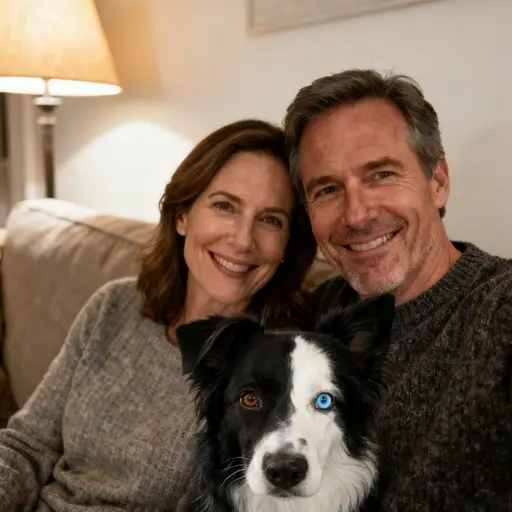
In our tests the dog's markings and eye color, including a Border Collie with one brown and one blue eye, were kept, and the people usually stayed unchanged. Sometimes the framing shifted, so check the free preview. Photos with children are allowed when you are their parent or legal guardian and everyone in the photo has agreed. AI Pet Portrait (aipetportrait.ai) turns one pet photo into a portrait in 45 styles and 10 famous paintings in about 30 seconds, with a free watermarked preview after sign-in and HD downloads from $5.99.
Sample portraits
Real results from our model tests. The people in these examples are AI-generated and fictional. Hold any image to compare it with the original.
AI edit: a black-and-white Border Collie added in front of a couple on a living-room sofa
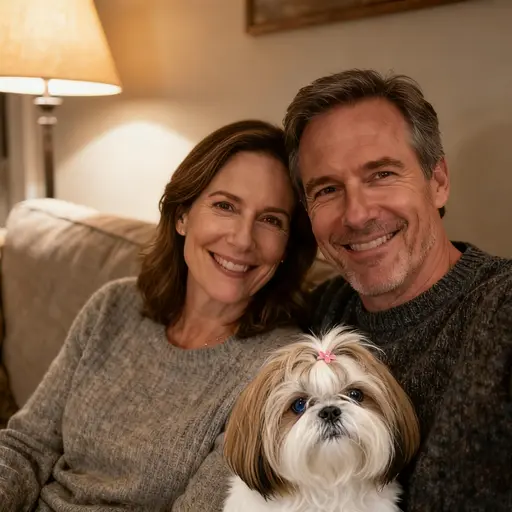
AI edit: a Shih Tzu with a pink hair clip added in front of a couple on a sofa
Frequently asked questions
Everything about photos, pricing, printing, privacy and ownership, kept in one place.
How do I make a family portrait with my dog without a photographer?
Upload a family photo you already have and a clear photo of your dog on this page, tick the consent box and press Generate. AI Pet Portrait adds your dog into the family photo in about 30 seconds. You see a free watermarked preview after sign-in and can unlock the HD file for 4 credits.
Will my dog look like my dog?
The AI keeps your dog's breed, face shape, coat colors and markings, eye color and accessories such as collars or hair clips. In our tests with a Border Collie and a Shih Tzu, markings and different-colored eyes were kept. Use a sharp, well-lit photo of your dog facing the camera, and start with a free preview to check.
Will the people in my photo change?
The AI is told to keep every face, pose, outfit and the number of people exactly as they are. In our tests the people usually stayed the same, but sometimes the model changed the framing slightly. Results that add or remove a person are blocked and refunded. Check the free preview before you unlock the HD file.
Can I add two dogs?
One dog is added each time, so the picture stays natural. For a second dog, use the finished picture as your new photo and run it again with the other dog's photo; each run costs 4 credits or one free preview. A failed generation returns its credit or preview automatically.
How much does it cost?
Adding a pet costs 4 credits for the HD file, and unlocking a preview also costs 4 credits. Your 2 free previews work here too. AI Pet Portrait (aipetportrait.ai) turns one pet photo into a portrait in 45 styles and 10 famous paintings in about 30 seconds, with a free watermarked preview after sign-in and HD downloads from $5.99.
Can I use a family photo with children in it?
Photos with children are allowed when you are their parent or legal guardian and everyone in the photo has agreed. Before generating, you confirm that everyone in the photo has agreed to its use. Photos of public figures are refused, and anyone can report an image for review. The rules are in our Acceptable Use Policy.
What happens to my photos?
Both photos are used only to make the picture you asked for and are not used to train AI models. Uploads are deleted within 24 hours and results after 30 days. Every photo and every result passes an automatic safety check, and only your account can open your files.
Simple one-time pricing
AI Pet Portrait (aipetportrait.ai) turns one pet photo into a portrait in 45 styles and 10 famous paintings in about 30 seconds, with a free watermarked preview after sign-in and HD downloads from $5.99.
Starter
$5.99
20 HD portraits
- Personal use
- Credits never expire
- No subscription
Best Value
Best value$14.99
80 HD portraits
- Commercial use license
- Credits never expire
- No subscription
One-time purchase · Credits never expire · HD 2048×2048 · No subscription
Prints & gifts
Put any finished portrait on a mug, print, canvas, pillow, blanket or ornament. Prices include standard shipping in the US.
Ceramic mug
from $29
11 oz $29 · 15 oz $32
Framed print
from $89
8×10 in · white frame $89 · 11×14 in · black frame $109
Canvas
from $69
12×12 in $69 · 16×20 in $109
Poster
from $29
8×10 in $29 · 11×14 in $39
Pillow
from $65
18×18 in $65
Fleece blanket
from $99
50×60 in $99
Ornament
from $29
Heart $29 · Round $29
US addresses only. Sales tax, if any, is added at checkout. The HD file of the portrait is included. Shipping Policy
Your favorite photo is already enough.
Choose one clear photo and see what your pet looks like as a work of art.
Create a free preview